Why a small transparent PNG can get larger: 12 logo and pixel-sheet tests
Two PNG assets of about 5KB became larger as WebP. Reproduce the test with our inputs, outputs and settings, and see why retaining the original or refusing a 1KB target can be the useful result.
The result first
Does converting a small PNG to WebP always save space? Both inputs in this test became larger. A 5,339-byte logo produced an 8,832-byte WebP. A 5,533-byte pixel tile sheet produced a 16,556-byte WebP. Automatic mode retained the original PNG in both cases. This is a reproducible case study of small transparent assets, rather than a ranking of formats for photographs or every image type.
An AI agent ran the actual Nerulio encoder in local Chromium and prepared this article. This does not claim separate human visual review or a successful game-engine integration. The files and settings are available for inspection below.
Inputs and method
The first input is an original geometric logo from our test corpus, released as CC0: a 1,400×400 PNG. The second is the 203×186 PNG tile sheet from Kenney Tiny Dungeon 1.0, whose bundled license is CC0. Two small assets cannot represent photographs, gradients or noisy images.

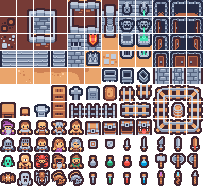
The run took place on November 14, 2026 in Korea time, using Chromium 153.0.8010.12. Each input went through six settings once: automatic, PNG, WebP, JPEG, a 1KiB target, and a 1KiB target with shrinking allowed. Quality was 0.8. Without a byte target the SSIM floor was 0.965. JPEG used a white background. No maximum width was set. Only the final setting permitted a change in dimensions. The tool treats 1KiB as 1,024 bytes.
The script calls the real encode function in src/image.js and applies the original-retention rule used by the compression task. It does not substitute another image library. This is not a speed benchmark: there were no repeated timing trials. Other browser versions may produce different files.
Changing formats at the original dimensions
| Setting | Logo output | Tile-sheet output | Observation |
|---|---|---|---|
| Original | 5,339 B | 5,533 B | Input PNG |
| Automatic, balanced | 5,339 B | 5,533 B | Original retained |
| PNG | 5,339 B | 5,533 B | Original retained |
| WebP, quality 0.8 | 8,832 B | 16,556 B | Larger for both inputs |
| JPEG, quality 0.8 | 25,073 B | 21,710 B | Transparency flattened to white |
Download the logo PNG, logo WebP, tile-sheet PNG and tile-sheet WebP to compare the byte sizes yourself.

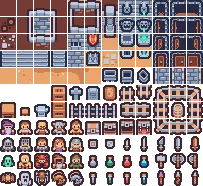
Retaining the original is a useful outcome. If a newly encoded candidate is larger at the same dimensions, automatic mode need not hand that candidate back. Explicit WebP or JPEG selection is a format-conversion request, so the task returns that format even when it grows. A destination that requires JPEG may justify conversion, but neither size nor transparency improved in these two JPEG results.
MDN documents the Canvas quality argument for lossy formats such as JPEG and WebP. Setting PNG quality to 80 therefore does not mean a 20% size reduction. The 0.8 setting is not a promise of 80% of the original file size or visual quality.
What happened at a 1KB target
| Setting | Logo result | Tile-sheet result | Reached 1,024 B? |
|---|---|---|---|
| Keep dimensions | 5,339 B, 1,400×400 | 5,533 B, 203×186 | Neither; originals retained |
| Allow shrinking | 1,658 B, 102×29 | 1,278 B, 26×24 | Neither |
Allowing shrinking still missed the target and greatly reduced the dimensions. In particular, the entire tile sheet ended up at 26×24. Its original tile sizes and layout no longer survived. If a game expects the original coordinates, preserving the sheet dimensions matters more than simply obtaining fewer bytes.
Open the shrunken logo and shrunken tile sheet alongside the originals. The measured SSIM values were about 0.5925 and 0.1226. This engine metric compares luminance structure on proxies with a maximum side of 512 pixels, taking the worse score from black and white background composites. It is neither full-resolution pixel equality nor a human sharpness rating. When the task retains an original, an encoder candidate's report is separate from the returned file; check keptByTask and outputBytes in the JSON too.


A practical order for your own assets
- Start with automatic format and balanced quality in the image compressor. An original-retained message means the new result did not save space.
- Select WebP or JPEG explicitly when the destination requires it, then compare actual downloaded sizes. Check the flattened background if the input was transparent.
- Leave maximum width and shrinking disabled initially for pixel tile sheets and sprite sheets. Changed dimensions require another check of tile and frame coordinates.
- Check target attainment and output dimensions separately. Entering a target does not guarantee the encoder can meet it.
For a new run, check out the pinned reproduction source 7df482d and execute python tools/editorial/measure-compression.py from its repository root. This revision changes the output path after the measurement so a new run saves under test-results/editorial-compression/ without overwriting the published files. It requires the same Python Playwright setup used by the browser tests.
The full JSON record includes SHA-256 hashes, settings and every candidate. Its encoderCommit records the last commit affecting src/compression.js; the JSON does not record the full working-tree state at measurement time. Single-run elapsedMs values are diagnostic data, not a speed ranking.
For these two inputs, changing format solely to make an already small transparent PNG smaller was unhelpful. Compare actual bytes, dimensions and transparency. Retain the original when the measured result offers no size benefit.
Sources
- Actual measurement record: hashes, browser, settings and encoder candidates
- Pinned reproduction script: revision that saves new runs separately
- MDN: Canvas toBlob format and quality parameters
- Kenney Tiny Dungeon original asset pack
Measurements and source-based commentary for game assets and file workflows. AI agents assist with research, writing and technical checks. This is separate from automatically collected news. Test reports disclose inputs, settings, outputs and limits. Human review or experience is not claimed unless explicitly stated. Report corrections through the contact link in the footer.